Capture the work without over-specifying it.
Systematical 001
Agent Project OS
A minimal Notion system where agents pull planned coding tasks and push every meaningful completed outcome back into a trustworthy work log.
Open sandbox checkout
$49one-time purchase
AI CODING WORK LOGWork
All workNAMESTATUSAGENTRESULTRELEASE
Tighten onboarding copyDoneCodexShipped clearer first-run steps✓
Fix checkout error stateDoingClaudeIn progress—
Draft version 1.0 notesReadyUnassignedWaiting—
The entire model
One row per piece of work, whether it was planned first or recorded afterward.
Agents pull Ready rows from Notion and push completed ad-hoc work back as Done rows. There are no separate databases for projects, runs, events, decisions, checkpoints, or releases.
The database
Eleven useful fields. Nothing ceremonial.
NameThe task, bug, improvement, or release
StatusInbox · Ready · Doing · Blocked · Done
ProjectThe product or initiative
RepositoryWhere the code lives
Human OwnerThe accountable person
AgentCodex, Claude, or another agent
WorkflowOptional process name, including fstack
ResultA short, human-readable outcome
EvidenceA commit, pull request, or deployment URL
Release NoteWhether the result is customer-facing
UpdatedThe last meaningful update
Inside the Notion template
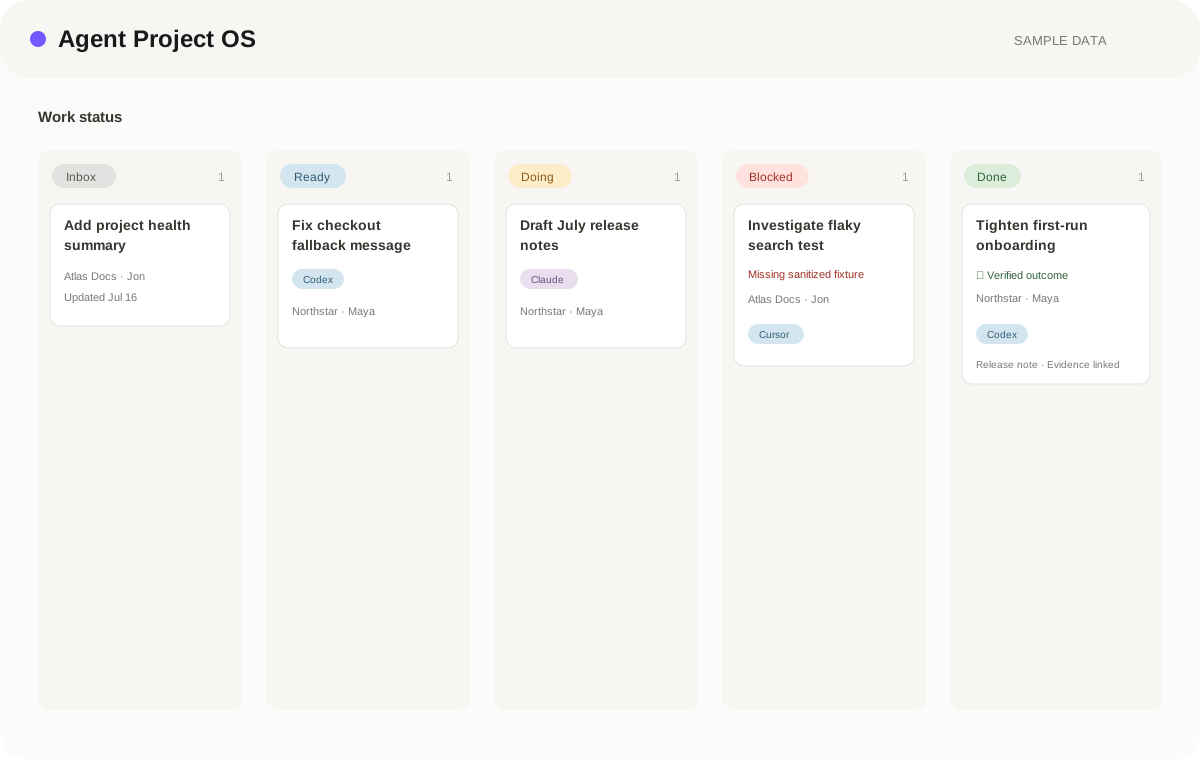
See the system before you buy.
This is the real structure and sample data included with Agent Project OS. The public demo is view-only; duplication belongs to the private customer template, not the showroom.
Realistic sample recordsUseful on Notion FreeNo credentials or production data
View-only demo prepared; public sharing is being verified.
Daily workflow
Give it enough context for a human or agent to start.
Name the agent and keep one active source of truth.
Write the result and link the Git evidence.
Blocked is a visible side path, not another process.
No row existed? After meaningful work finishes, the agent creates one Done row with the outcome, attribution, and evidence.
What you receive
A usable template, not a platform to maintain.
- The Notion templateStart Here instructions, Work database, useful views, examples, version, and privacy note.
- The Systematical skillOne agent skill that connects a repository, pulls planned work, pushes completed work, reports status, and drafts release notes.
- Repository instructionsA short AGENTS.md convention so agents know when and how to update the log.
- Team conventionsHuman owner and agent attribution without a separate people database.
- Release-notes viewFilter Done rows with Release Note checked and publish only what matters.
The optional AI layer
Your template becomes shared memory.
Agent Project OS stays useful on its own in Notion. When your AI tool can read the workspace directly—or you provide an export—the included instructions turn it into a careful assistant.
Start read-only. Draft changes before writing. Keep consequential decisions human.
01Read
Brief me
Answer a focused question about project intent, planned work, agent results, decisions, and Git evidence, using the workspace as the source and pointing back to the relevant records.
02Draft
Structure the input
Turn notes, files, or a conversation into draft Agent Project OS records. Ask for missing facts instead of inventing them.
03Review
Run the review
Find missing, stale, contradictory, or urgent information across project intent, planned work, agent results, decisions, and Git evidence, then prepare a human-reviewed action list.
Works across AI toolsConnect Notion or provide an exportPaste the included agent instructionsApprove any write or action
Designed to coexist
Keep the tools that already work.
Git stays authoritative for code. Systematical links to commits and pull requests instead of copying technical history into Notion.
Your coding agent stays in control of coding. The skill records work; it does not invent an orchestration layer.
fstack stays optional. Put the fstack skill name in Workflow when it helps. Systematical does not manage its phases.
Automation stays optional. The template is useful when operated by hand and becomes faster when agents update it.
Questions
Before you buy
Do I need a specific AI coding tool?
No. The model works with Codex, Claude Code, Cursor, or any agent that can read instructions and update Notion.
Does it replace GitHub Issues or Linear?
It can be your lightweight backlog, but it does not need to replace an existing tracker. Its main job is the shared, readable record across projects and agents.
Can a team use it?
Yes. Human Owner and Agent make attribution explicit without introducing a separate participants system.
Are release notes automatic?
The template identifies release-ready rows. An agent can draft notes from that filtered view, while you retain final approval.
Start simple
Give every coding agent one place to report the work.
Duplicate the template, connect the skill, and start with the next real task.